
Replacing my compact calendar spreadsheet with an ICS-powered web app
I’ve used some form of DSri Seah’s Compact Calendar for over seven years. The calendar is a lovingly designed single-page view of the entire year, organized into Monday-through-Sunday weeks with no breaks between months.
The point of the format is simple: my normal calendar is great at telling me what I’m doing on Tuesday. What it’s terrible at is answering planning questions that are above the day level, such as:
- If we take a vacation the last two weeks of July, will it overlap business travel?
- Can we connect these two public holidays and get 14 days away for only 8 days of PTO?
- Do we have any genuinely empty weeks left this year?
For a long time, my compact calendar was a spreadsheet. That worked until it didn’t.
The problem I actually needed to solve
The spreadsheet version served me well for years, but life got more complicated.
My kid is getting older, which means more activities to track: summer camps, school breaks, etc. My partner and I no longer work for the same company, so we don’t share the same corporate holidays and as our roles have changed so has the amount of travel we do. And, honestly, my spreadsheet has bespoke formulas that only I understand … on Thursdays when there is a full moon.
My partner knows how to use a calendar app. She really doesn’t want to learn a special spreadsheet for planning, and I don’t blame her.
The real friction screaming out that there had to be a better way was the double-entry work. If my kid has summer camp in July, I’d put it on the family calendar - and then manually mark those weeks on my compact calendar spreadsheet. Two sources of truth means one of them is eventually wrong.
So the job wasn’t “build a better calendar.” It was: keep the year-at-a-glance view, but make the calendar app the source of truth.
The shape of the solution
I decided to build a web version of the compact calendar that could read directly from standard ICS calendar feeds.
Put the summer camp on the shared calendar once. The compact calendar picks it up automatically.
And if this was going to be something my partner and I actually used together, it needed two things:
- A simple setup flow (not “copy this spreadsheet and don’t touch column Q”)
- A way to always be available beyond, “go find this Google Docs Link”
What the tool does
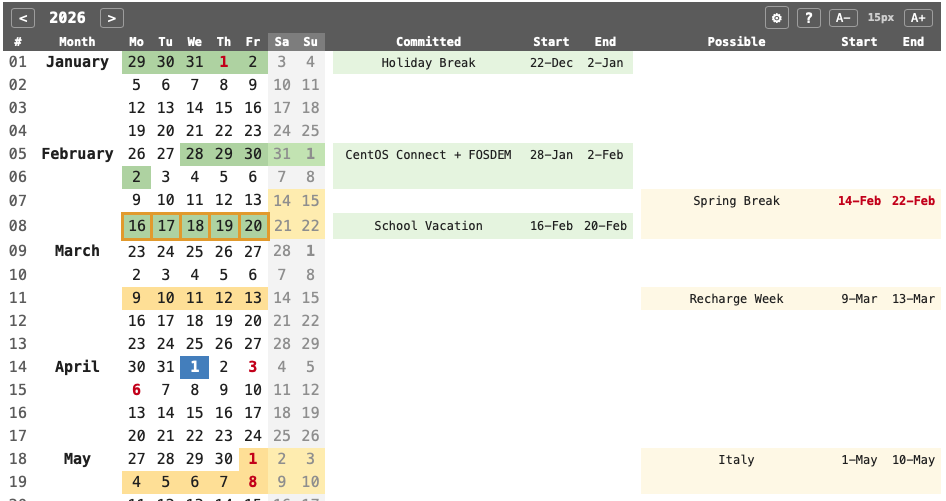
The calendar renders a full year on a single page. Each row is one week, Monday through Sunday.
Parallel to the block of weeks running down the page is a column for displaying committed events and a second for displaying possible events.
- Committed: events that are definitely happening - travel that’s booked, school terms, confirmed work trips.
- Possible: things under consideration - a conference I submitted a talk to but haven’t heard back from yet, vacation options we’re weighing.
The tool uses color to signal status at a glance:
- Blue background: first day of the month (anchors the continuous weeks)
- Red text: public holidays (per selected country)
- Green background: committed events
- Yellow background: possible events
- Green background with a yellow border: overlaps/conflicts that need attention
Here’s what the full-year view looks like with demo data loaded:
Inputs: URL, file, or demo
While there is demo data available in the system, the key comes from loading your own data. You can choose two different kinds of sources:
- A URL - a
webcal://orhttps://link to a published calendar (iCloud, Google Calendar, etc.) - A file - a
.icsfile uploaded from your computer
We’re an Apple household so our calendars live in iCloud, but the tool doesn’t care about your calendar provider. Anything that produces a standard ICS feed works.
My practical workflow is two shared calendars in Apple Calendar:
- one for committed travel and events. For me, this is actually my shared calendar that our family maintains.
- one for possibilities we’re considering
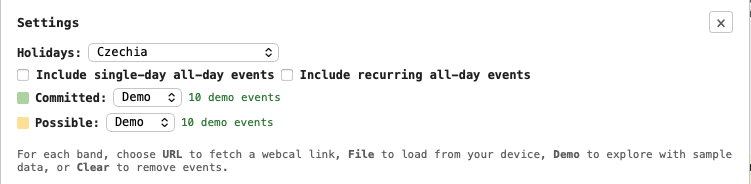
Both are published as webcal URLs, and the compact calendar fetches them and renders the year view. Using my shared calendar works because the app ignores events that aren’t multi-day, all-day blocks - so dentist appointments don’t drown out the year view. You can optionally include single day all-day events if that helps you.
The setup controls are intentionally simple:
The tech (and the annoying part)
This is a vanilla JavaScript app built with Vite, hosted on Azure Static Web Apps. No framework - just DOM manipulation, a CSS file, and under 500 lines of main application code.
The interesting technical problem was CORS.
Calendar providers like iCloud don’t set CORS headers on their published feeds, which means a browser can’t fetch them directly. The solution is a small Azure Function that acts as a proxy:
- the browser sends the calendar URL to the server
- the server fetches the calendar data
- the server returns it to the browser
The proxy doesn’t store or log anything. It’s a pass-through.
I built the app with an AI coding agent. I provided direction and made decisions, but I didn’t hand-write every line. For this kind of tool, I’m comfortable with that. It’s a static site that renders calendar data client-side, and the risk profile is low. Additionally, nothing in this code represents a new problem or a novelty. This is bog-standard code, and the agent handled the boilerplate well for this project.
Importantly, even though I could have written this code myself, I wouldn’t have. I probably would have gotten myself caught in a bit of analysis paralysis over frameworks. But more importantly, writing a lot of this code is just boring code to write. The AI agent has allowed me to solve my own problem, and that’s the part that matters to me. I didn’t have to suddenly become more disciplined about spreadsheets or get my family dragged onto a tool that really only speaks to me. Instead, I was able to change the shape of the problem and make it more solvable within the context of the humans involved.
Privacy and the honest trade-off
All your data stays in your browser. The app stores the URLs you’re loading, your selected country, and cached holiday data in local storage. This is purely functional and not for tracking.
Calendar URLs necessarily have to go through the server-side proxy because browsers won’t fetch them directly. The proxy is a stateless pass-through — I don’t persist calendar data in the function or in your browser. Calendar URLs are sent via POST request body rather than query parameters, which means they aren’t captured in Azure’s platform-level request logs. Error logging includes only the target hostname (e.g., “iCloud fetch failed”), never the full URL or authentication tokens. If your calendar URL contains authentication tokens (iCloud URLs do), understand that the proxy briefly sees them in transit.
Try it out
The calendar is live at cc.bexelbie.com. You can load the built-in demo data to explore without connecting your own calendars - select “Demo” from either input dropdown.
The source is on GitHub at bexelbie/online-compact-calendar. If you have ideas or find bugs, open an issue.
On first visit, there’s a banner that points you at settings:

What’s next
I’m going to live with it for a while before adding features. The spreadsheet served me for seven years with almost no changes.